当你把编码智能体与 Stitch CLI 搭配使用时,终端就成了一间设计工作室。最好的结果,并不是让智能体给你一个通用的应用模板,而是先给 Stitch 一个真实的视觉锚点,在第一轮就把画面框定干净,再基于实时 HTML 反复迭代。
如果从空白提示词开始,你很可能会得到一套平庸的配色。先给 Stitch 一些真实的东西去回应。
在向 Stitch 提出 UI 需求之前,先生成界面中会用到的艺术素材。你可以在 Google AI Studio 中使用 Gemini 3 Pro Image(gemini-3-pro-image)以 1:1 比例生成这些图片——让模型铺满整个画幅、不留边,这样你得到的是一张纯粹的专辑封面,而不是带边框或墙面样机的图片。
下面是两张专辑封面所用的提示词——Late Sun on the Hudson(温暖的焦赭色与土黄色)和 Cobalt Shadows(暮色钴蓝与靛蓝):
Full-bleed edge-to-edge square impasto oil painting filling the entire 1:1 frame to all four edges (not a photo of a canvas on a wall; the image itself is the painting surface edge-to-edge). Expressive palette-knife and brush strokes depicting late afternoon sun over the Hudson River: warm burnt sienna, golden ochre, and cadmium orange sunlight reflecting across deep ultramarine and Prussian blue water, with atmospheric skyline silhouettes in the distance.
Full-bleed edge-to-edge square impasto oil painting filling the entire 1:1 frame to all four edges (not a photo of a canvas on a wall; the image itself is the painting surface edge-to-edge). Expressive palette-knife and brush strokes depicting twilight over a quiet harbor: deep cobalt blue, Prussian indigo, and cool slate-violet water with pale moonlight silver and warm amber harbor reflections.
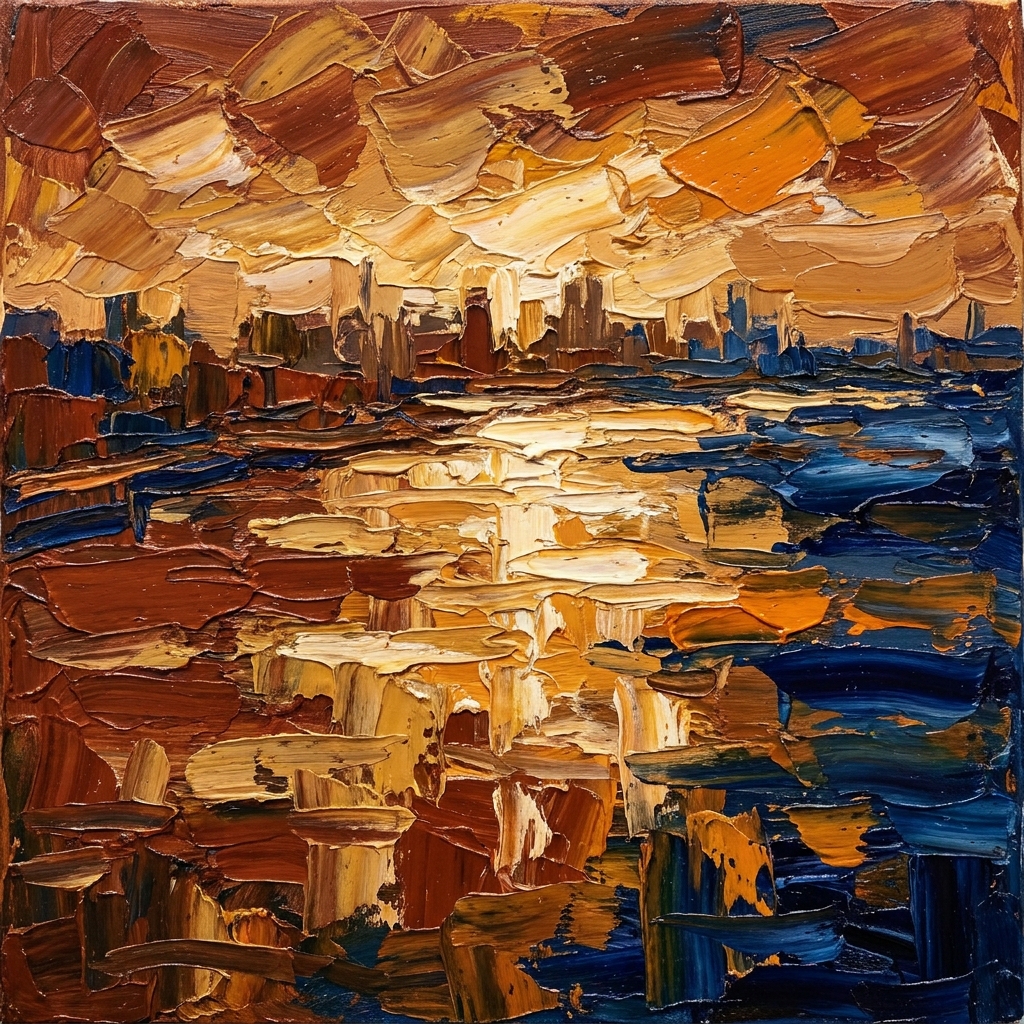
曲目 01 — Late Sun on the Hudson
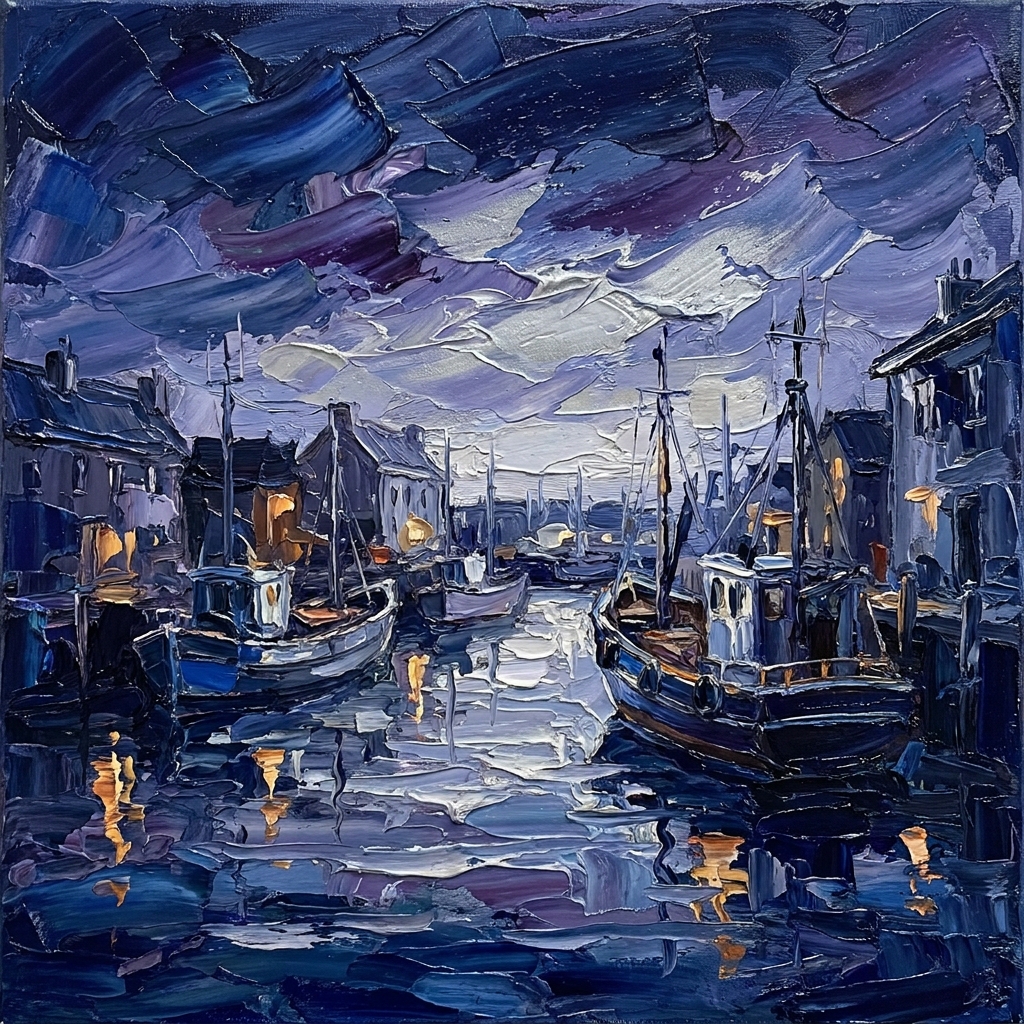
曲目 02 — Cobalt Shadows
把生成的图片保存到本地,再用 stitch upload screen 上传到你的 Stitch 项目:
stitch upload screen ./hudson-album-art.png \
  --title "Late Sun on the Hudson"

stitch upload screen ./cobalt-shadows-art.png \
  --title "Cobalt Shadows"
艺术作品进入画布后,你可以用 stitch get screen <screen-id> --format json 获取它的托管 URL,也可以直接编辑上传后的屏幕。在提示词中传入这个托管 URL,Stitch 就会逐像素嵌入你的原作,而不是自行编造一个占位图。
当你一次性要求生成整个应用时,模型总爱在每个角落塞满状态圆点、胶囊徽章和假导航栏。告诉 Stitch 画布上该有什么,其余的一律不要。
想要一张构图聚焦、有棚拍感的作品,一套好用的配方包含四个节拍:
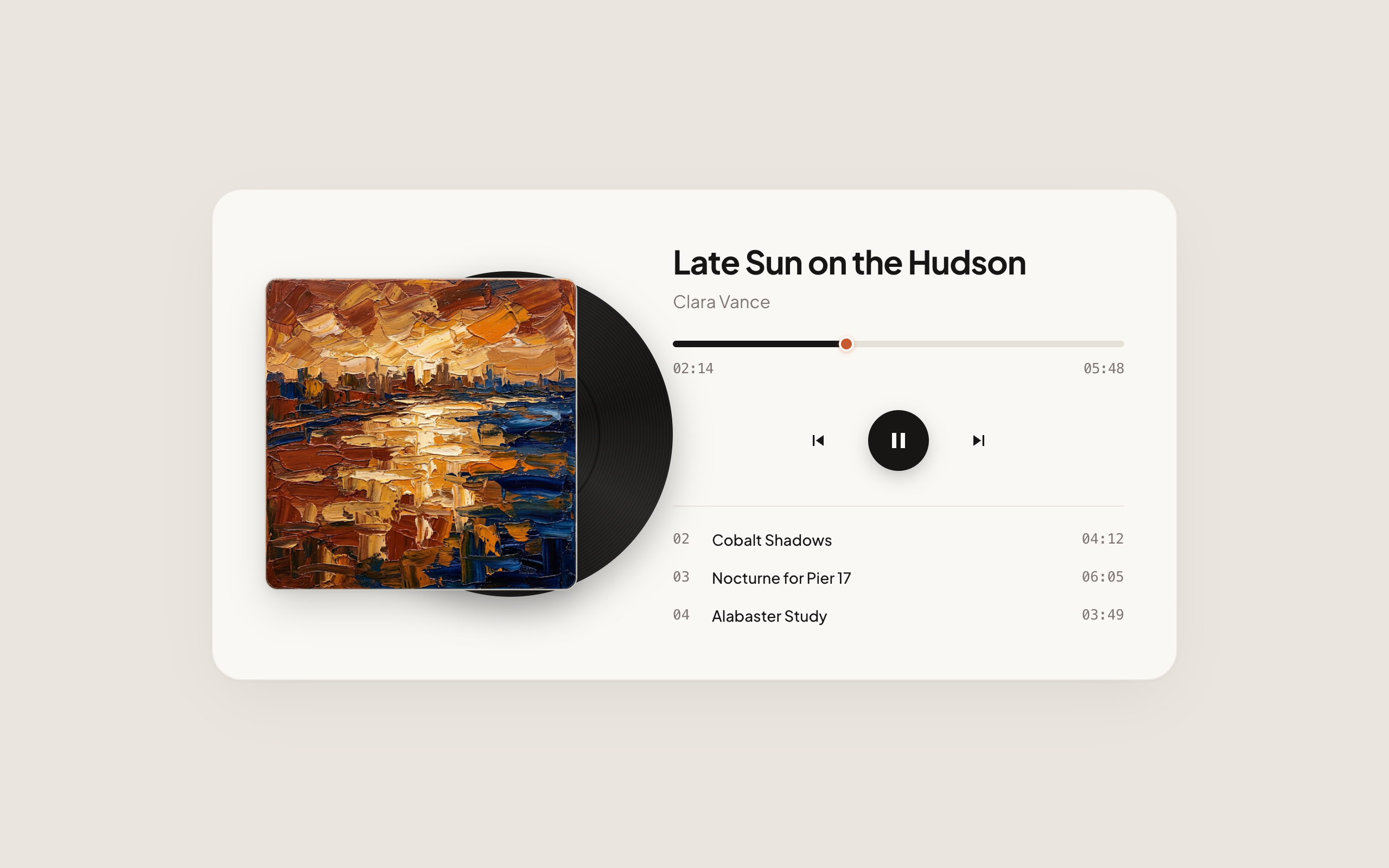
CanvasCenter a single, sculptural music player card on a completely empty, solid warm stone background (#EAE6DF) with generous outer margins. The outer background canvas must remain completely blank with no text, headers, or footers outside the player card.
PrinciplesEvery element and piece of text inside the card must be essential and earn its place. Include only the album sleeve with its vinyl record, the exact titles, numerals, and controls listed below—render all text as plain, unbordered words without status dots, badge containers, or extra technical labels.
ArtworkInside the centered player card (warm alabaster surface #FAF8F4 with deep espresso ink #181615, set in Plus Jakarta Sans), display the uploaded square impasto oil painting on the left. Extending smoothly from behind the right edge of the square sleeve with about 28% of the disc visible, render a tactile matte-black vinyl LP record with subtle concentric micro-grooves, realistic vinyl sheen, and a warm terracotta center label.
PlaybackOn the right side of the card, set the track title “Late Sun on the Hudson” in 30px bold Plus Jakarta Sans with artist name “Clara Vance” directly beneath in 16px muted warm grey. Below that, place a clean horizontal scrub bar (“02:14” to “05:48”) with a warm terracotta playhead handle, three centered playback controls (previous, solid espresso-ink circular play/pause button, and next), and a three-row tracklist showing only plain track numbers, titles, and durations (“02 Cobalt Shadows 04:12”, “03 Nocturne for Pier 17 06:05”, “04 Alabaster Study 03:49”).
针对上传的艺术作品屏幕运行 stitch edit screen,围绕这幅画构建播放器:
stitch edit screen <screen-id> \
  --device DESKTOP \
  --prompt "Center a single, sculptural music player card on a completely empty, solid warm stone background (#EAE6DF)..."
Stitch 会围绕你上传的画作构建播放器,并从笔触中直接提取温暖的赤陶色,用于黑胶唱片中心标签和进度条:
Stitch
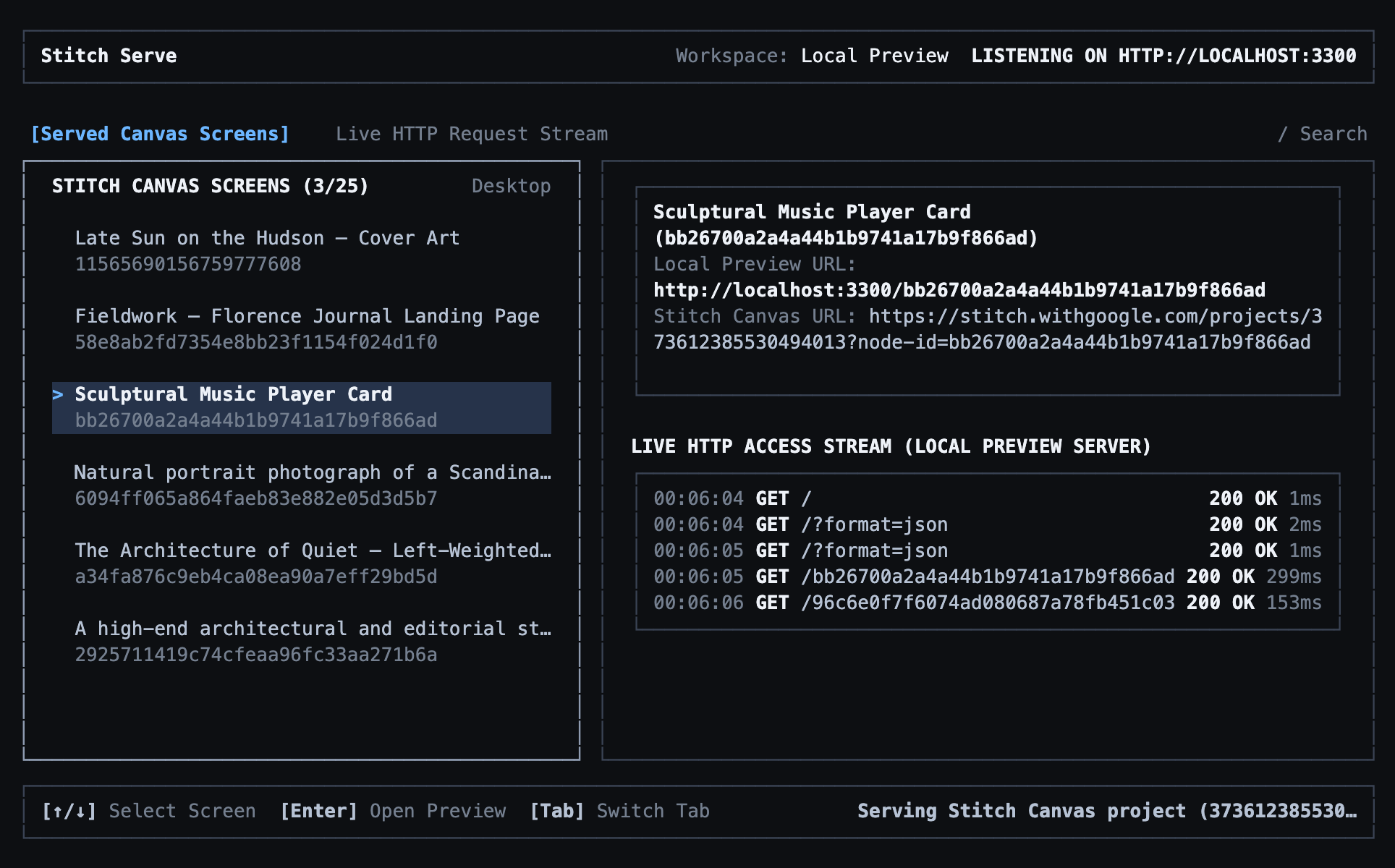
静态截图只能说明一半的问题。运行 stitch serve 启动本地预览服务器,你和编码智能体就能在 localhost 上检查实时 DOM:
stitch serve
Stitch
现在挑一项能让设计活起来的改动。由于 Stitch 输出的是真正的 HTML、CSS 和 JavaScript,你不必止步于静态布局。让 Stitch 把曲目列表和播放控制按钮接上逻辑,使点击曲目时能切换当前歌曲、封套画作和黑胶标签颜色:
InteractionMake this music player interactive so clicking any track in the tracklist or clicking the previous and next track buttons switches the active track, updates the title, duration, and scrub bar, and swaps the square album sleeve artwork and vinyl center label color.
PreservationKeep the exact same clean, unadorned layout and blank #EAE6DF outer background canvas with no extra labels, status dots, or badges.
TracksInclude all four tracks in the interactive tracklist (“01 Late Sun on the Hudson 05:48”, “02 Cobalt Shadows 04:12”, “03 Nocturne for Pier 17 06:05”, “04 Alabaster Study 03:49”) with Track 02 (“Cobalt Shadows” by Clara Vance, elapsed “01:18” of “04:12”) active by default. Swap between the uploaded Hudson sunset painting (terracotta #C85A32 vinyl label and playhead) for Track 01 and the uploaded twilight harbor painting (deep cobalt #2C5E9E vinyl label and playhead) for Track 02, highlighting the active row in bold #181615 ink while inactive tracks rest in muted #7D7571 grey.
stitch edit screen <screen-id> \
  --device DESKTOP \
  --prompt "Make this music player interactive so clicking any track in the tracklist or clicking the previous/next track buttons switches the active track..."
在正在运行的 stitch serve 会话中打开更新后的屏幕,逐一点击队列中的曲目。选择 Cobalt Shadows 后,封套会切换为暮色港湾画作,黑胶标签和播放头也会从温暖的赤陶色变为深邃的钴蓝色:
Stitch
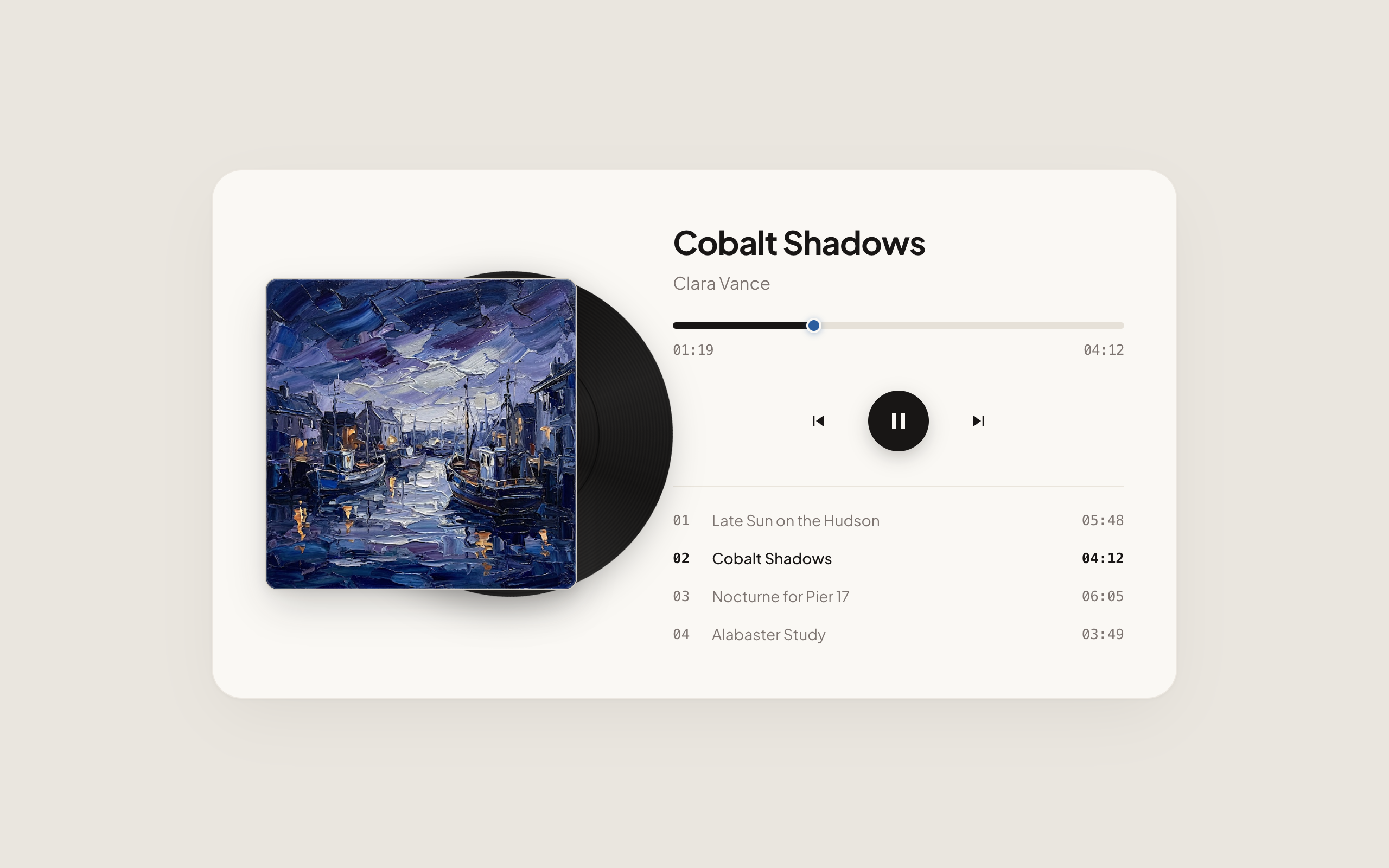
闭环已经形成:用真实素材做锚点,用清晰的约束框定屏幕,并在 localhost 上测试交互状态。当设计感觉对了,就把 HTML 引入代码库,或者继续一步一步打磨。
- 生成与编辑屏幕 — 从 CLI 探索变体和定向编辑。
- 同步设计系统 — 让本地
DESIGN.md 与 Stitch 项目保持同步。
- CLI 命令参考 —
stitch upload screen、stitch edit screen 和 stitch serve 的完整 flag 参考。
原文: https://stitch.withgoogle.com/docs/cli/agent-bridge/
本页翻译自 Google Stitch 官方文档,原文版权归 Google LLC 所有。本站为独立第三方翻译,与 Google 无关联。