コーディングエージェントと Stitch CLI を組み合わせれば、ターミナルがデザインスタジオに変わります。最高の結果は、エージェントに汎用的なアプリテンプレートを依頼することからは生まれません。Stitch に本物の視覚的アンカーを与え、最初のパスで構図をすっきりと整え、ライブ HTML を反復しながら仕上げていくことから生まれます。
空のプロンプトから始めると、ありきたりなカラーパレットになってしまう恐れがあります。まずは Stitch が反応できる本物の素材を渡しましょう。
Stitch に UI をプロンプトする前に、インターフェース内に収まるアートワークを生成します。これは Google AI Studio で Gemini 3 Pro Image(gemini-3-pro-image)を使い、1:1 のアスペクト比で生成できます。モデルにフレームを端から端まで埋めるよう指示すれば、枠や壁のモックアップのない純粋なアルバムカバーが得られます。
アルバムカバーに使用した 2 つのプロンプトは次のとおりです。Late Sun on the Hudson(温かみのあるバーントシエナとオーカー)と Cobalt Shadows(夕暮れのコバルトとインディゴ)です。
Full-bleed edge-to-edge square impasto oil painting filling the entire 1:1 frame to all four edges (not a photo of a canvas on a wall; the image itself is the painting surface edge-to-edge). Expressive palette-knife and brush strokes depicting late afternoon sun over the Hudson River: warm burnt sienna, golden ochre, and cadmium orange sunlight reflecting across deep ultramarine and Prussian blue water, with atmospheric skyline silhouettes in the distance.
Full-bleed edge-to-edge square impasto oil painting filling the entire 1:1 frame to all four edges (not a photo of a canvas on a wall; the image itself is the painting surface edge-to-edge). Expressive palette-knife and brush strokes depicting twilight over a quiet harbor: deep cobalt blue, Prussian indigo, and cool slate-violet water with pale moonlight silver and warm amber harbor reflections.
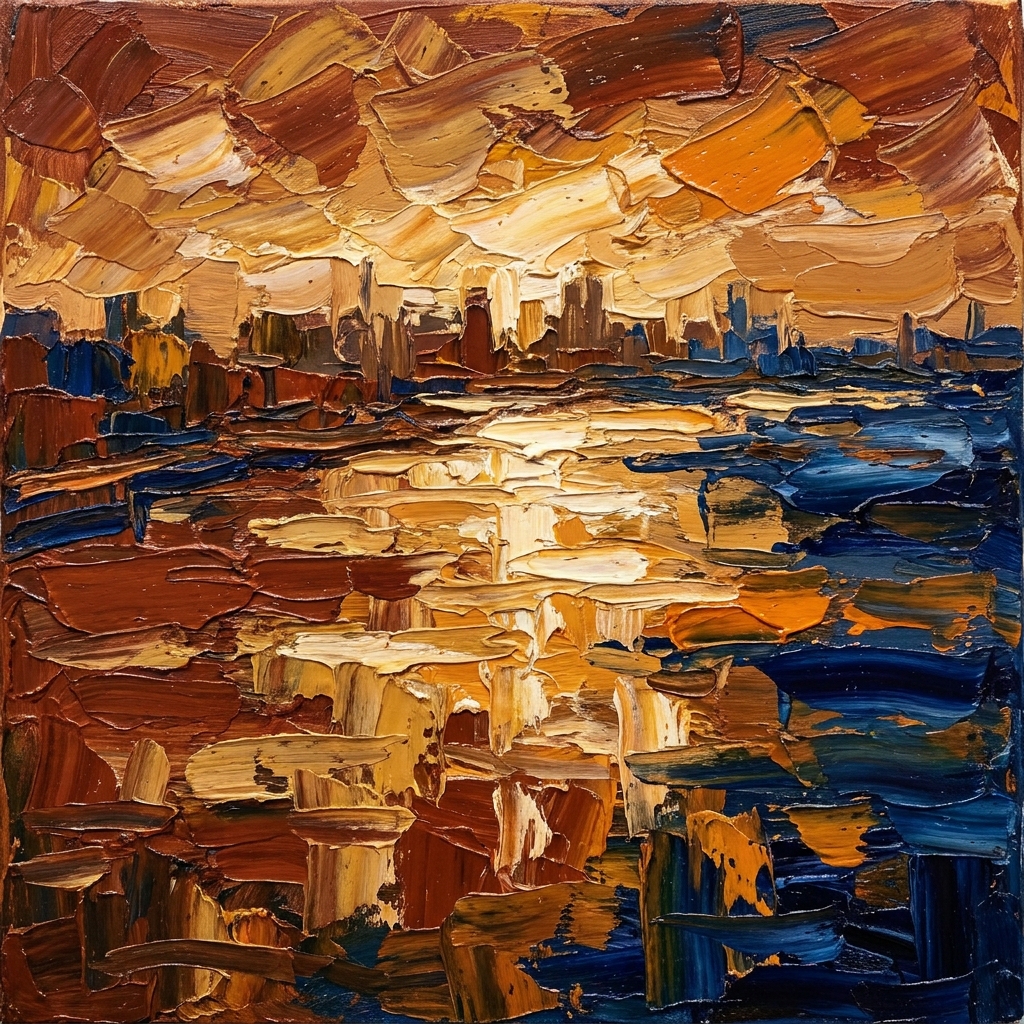
トラック 01 — Late Sun on the Hudson
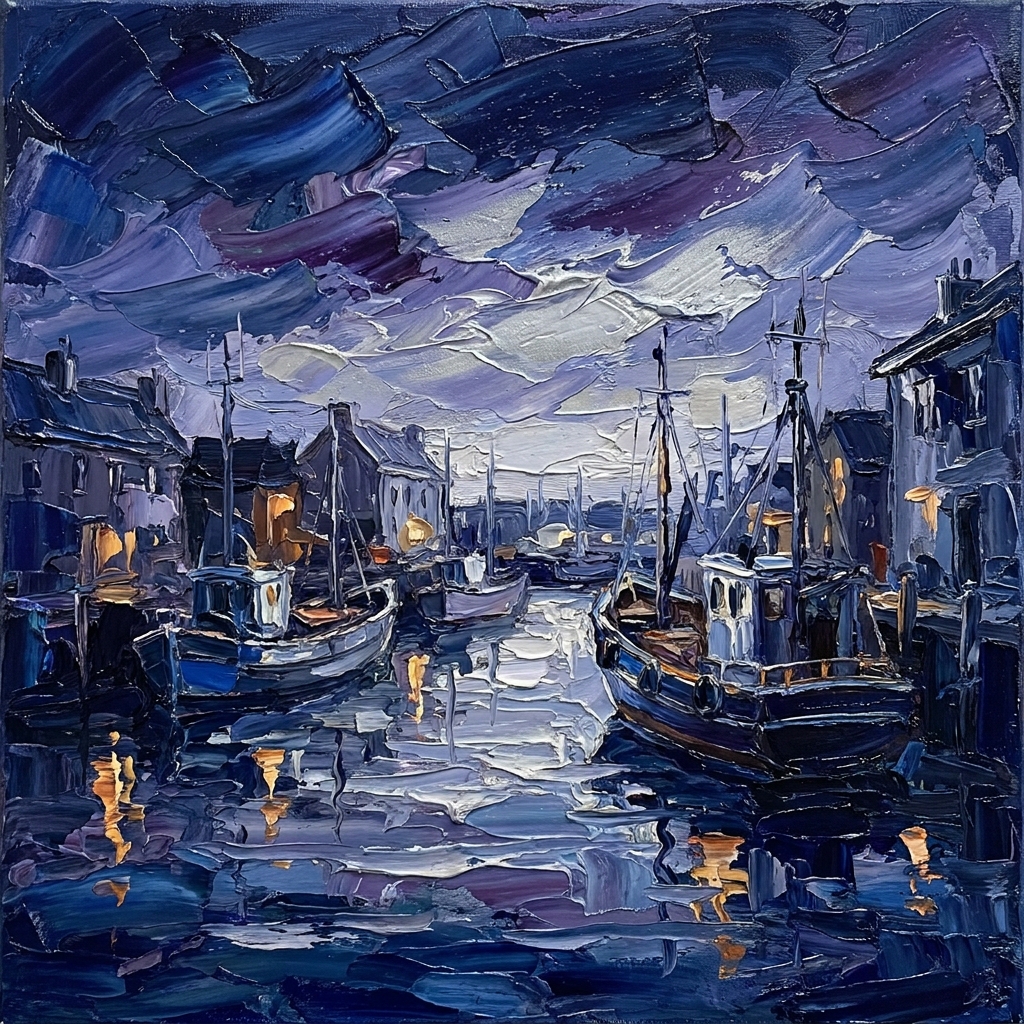
トラック 02 — Cobalt Shadows
生成した画像をローカルに保存し、stitch upload screen で Stitch プロジェクトにアップロードします。
stitch upload screen ./hudson-album-art.png \
  --title "Late Sun on the Hudson"

stitch upload screen ./cobalt-shadows-art.png \
  --title "Cobalt Shadows"
アートワークをキャンバスに置いたら、stitch get screen <screen-id> --format json でホスト URL を取得するか、アップロードした画面を直接編集できます。プロンプトにそのホスト URL を渡すと、Stitch はプレースホルダーを作り出すのではなく、あなたのアートワークをピクセル単位でそのまま埋め込みます。
アプリ全体を一度に依頼すると、モデルは隅々までステータスドットやピル型バッジ、偽のナビゲーションバーで埋めたがります。キャンバスに何を置くかを Stitch に伝え、それ以外はすべて排除しましょう。
集中したスタジオ風の 1 枚に仕上げるには、次の 4 つの要素で組み立てるのが効果的です。
CanvasCenter a single, sculptural music player card on a completely empty, solid warm stone background (#EAE6DF) with generous outer margins. The outer background canvas must remain completely blank with no text, headers, or footers outside the player card.
PrinciplesEvery element and piece of text inside the card must be essential and earn its place. Include only the album sleeve with its vinyl record, the exact titles, numerals, and controls listed below—render all text as plain, unbordered words without status dots, badge containers, or extra technical labels.
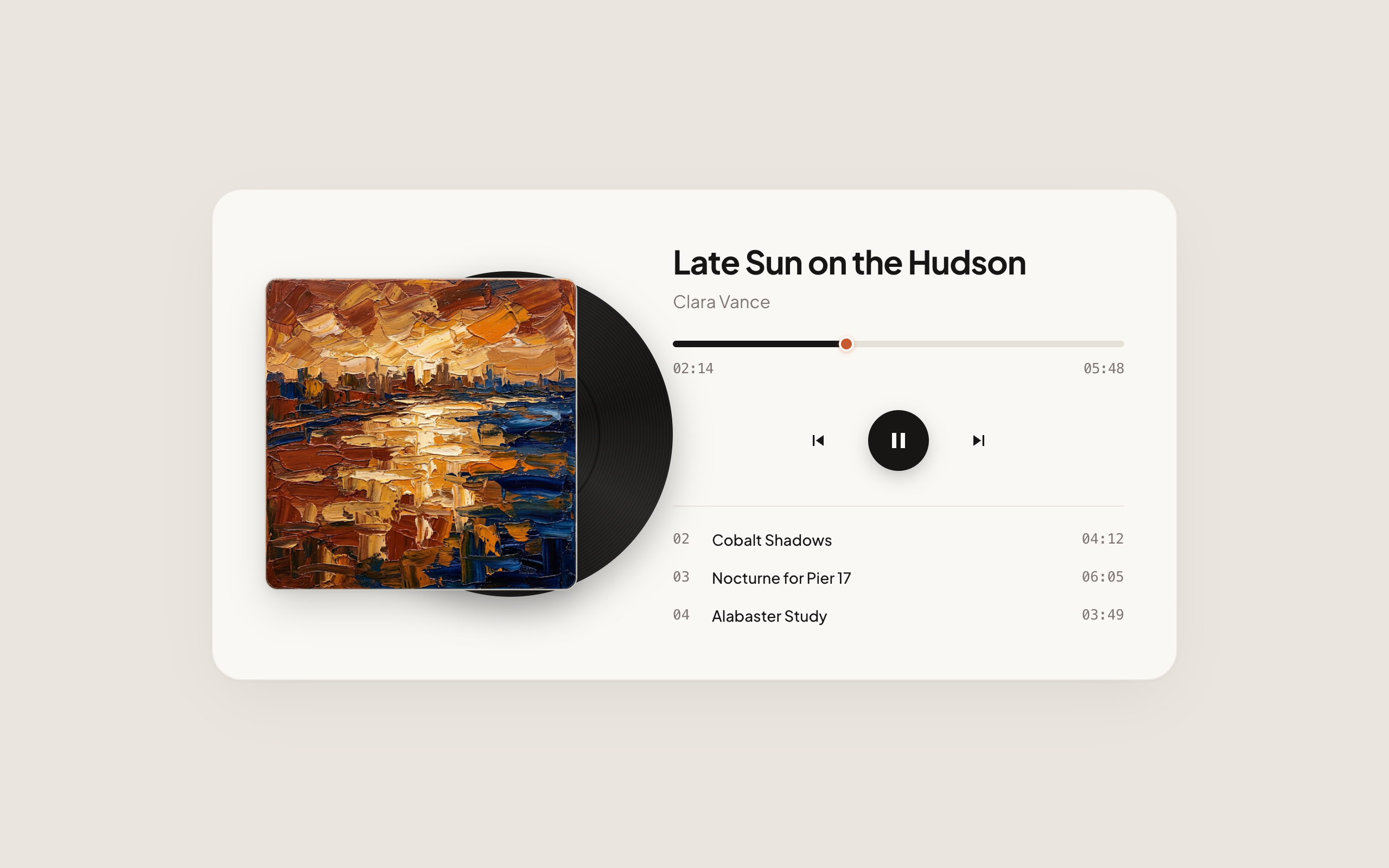
ArtworkInside the centered player card (warm alabaster surface #FAF8F4 with deep espresso ink #181615, set in Plus Jakarta Sans), display the uploaded square impasto oil painting on the left. Extending smoothly from behind the right edge of the square sleeve with about 28% of the disc visible, render a tactile matte-black vinyl LP record with subtle concentric micro-grooves, realistic vinyl sheen, and a warm terracotta center label.
PlaybackOn the right side of the card, set the track title “Late Sun on the Hudson” in 30px bold Plus Jakarta Sans with artist name “Clara Vance” directly beneath in 16px muted warm grey. Below that, place a clean horizontal scrub bar (“02:14” to “05:48”) with a warm terracotta playhead handle, three centered playback controls (previous, solid espresso-ink circular play/pause button, and next), and a three-row tracklist showing only plain track numbers, titles, and durations (“02 Cobalt Shadows 04:12”, “03 Nocturne for Pier 17 06:05”, “04 Alabaster Study 03:49”).
アップロードしたアートワーク画面に対して stitch edit screen を実行し、絵画を中心にプレイヤーを構築します。
stitch edit screen <screen-id> \
  --device DESKTOP \
  --prompt "Center a single, sculptural music player card on a completely empty, solid warm stone background (#EAE6DF)..."
Stitch はアップロードした絵画を中心にプレイヤーを構築し、レコード中央のラベルとスクラブバーの温かなテラコッタのアクセントを、筆致からそのまま引き出します。
Stitch
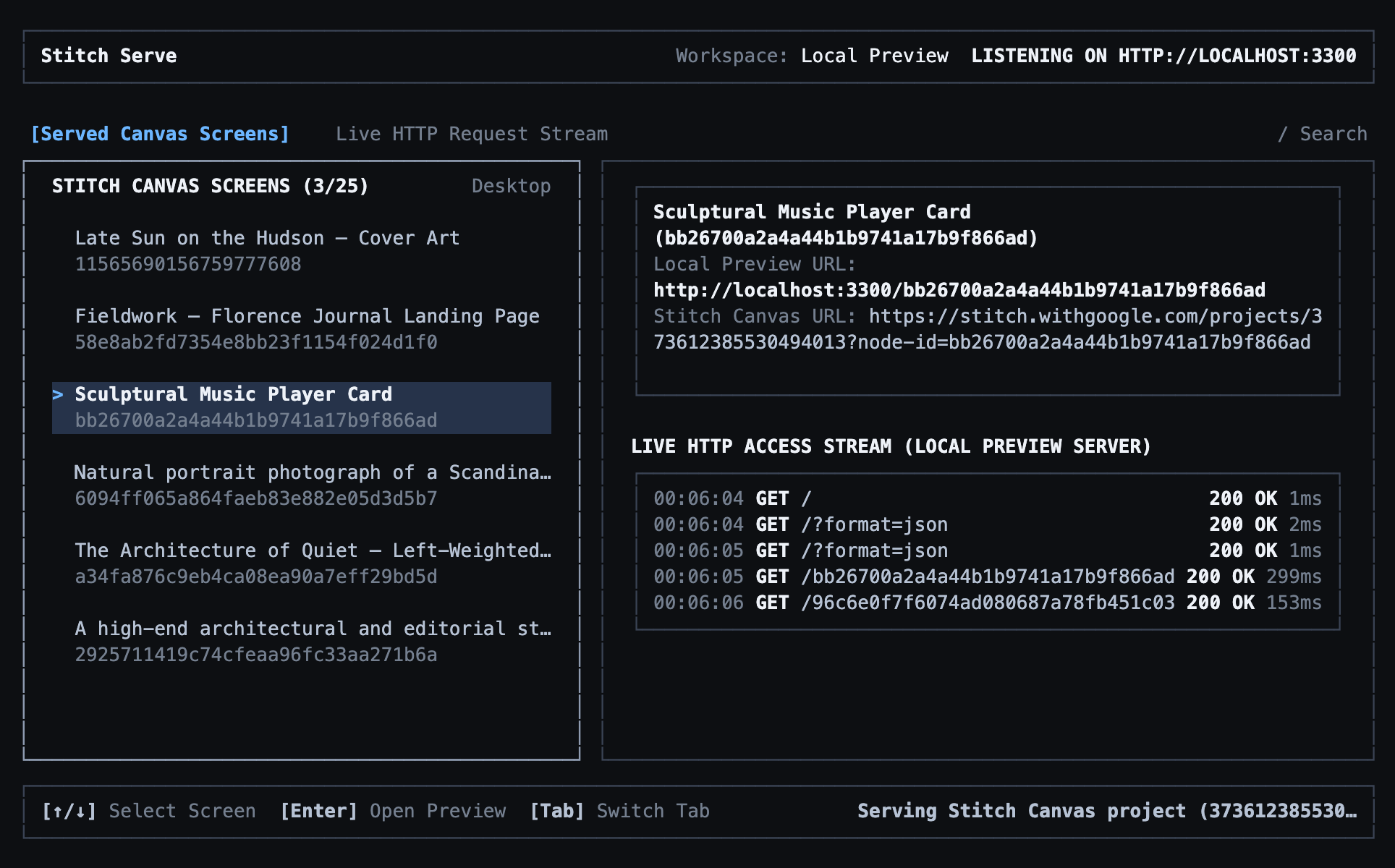
静的なスクリーンショットでは、物語の半分しか伝わりません。stitch serve を実行してローカルプレビューサーバーを起動すれば、あなたとコーディングエージェントが localhost でライブ DOM を確認できます。
stitch serve
Stitch
次に、デザインに命を吹き込む変更を 1 つ選びます。Stitch は本物の HTML、CSS、JavaScript を出力するため、静的レイアウトで止める必要はありません。トラックリストと再生コントロールを連動させ、トラックをクリックすると再生中の曲、スリーブの絵画、レコードラベルの色が切り替わるように Stitch に依頼しましょう。
InteractionMake this music player interactive so clicking any track in the tracklist or clicking the previous and next track buttons switches the active track, updates the title, duration, and scrub bar, and swaps the square album sleeve artwork and vinyl center label color.
PreservationKeep the exact same clean, unadorned layout and blank #EAE6DF outer background canvas with no extra labels, status dots, or badges.
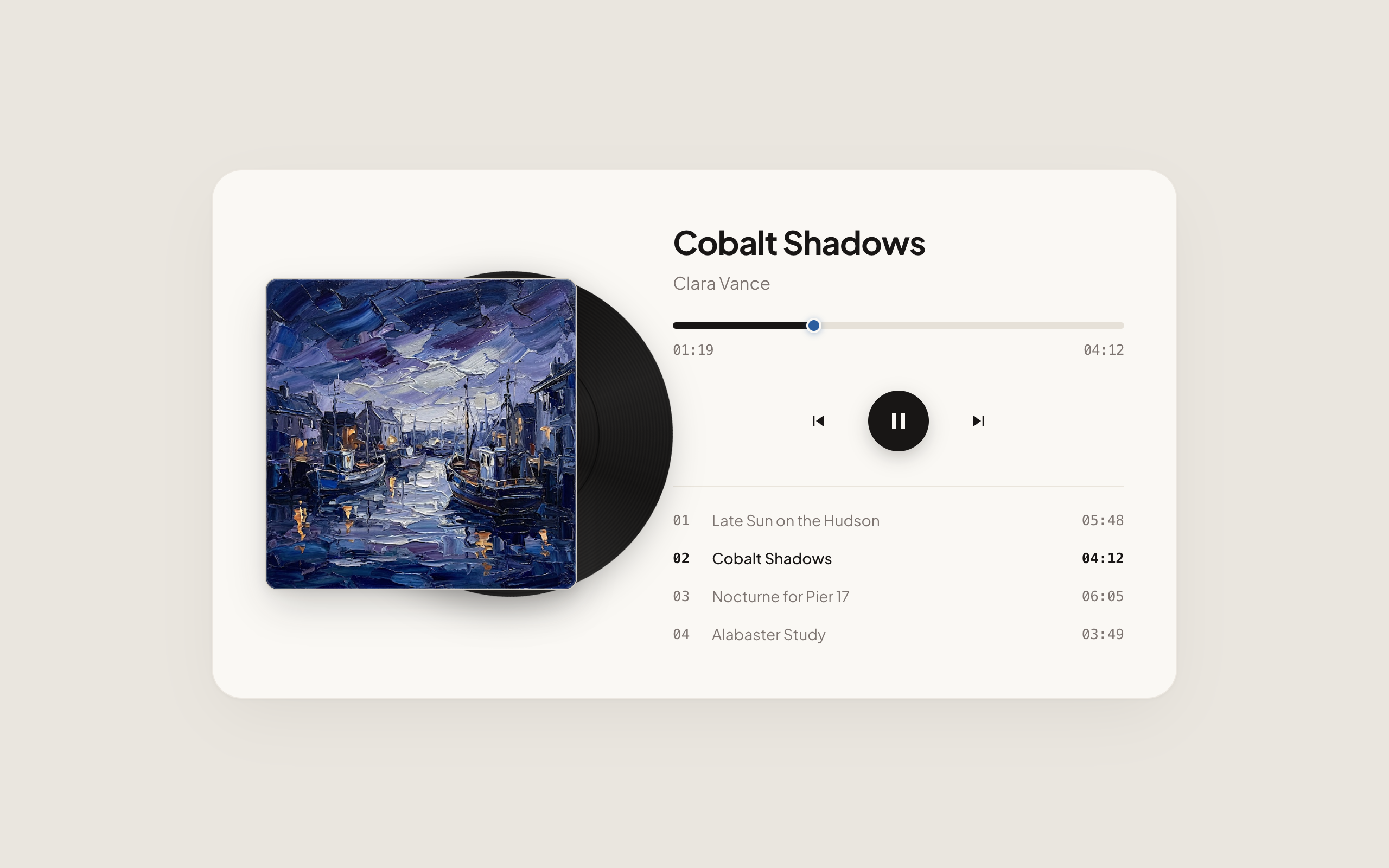
TracksInclude all four tracks in the interactive tracklist (“01 Late Sun on the Hudson 05:48”, “02 Cobalt Shadows 04:12”, “03 Nocturne for Pier 17 06:05”, “04 Alabaster Study 03:49”) with Track 02 (“Cobalt Shadows” by Clara Vance, elapsed “01:18” of “04:12”) active by default. Swap between the uploaded Hudson sunset painting (terracotta #C85A32 vinyl label and playhead) for Track 01 and the uploaded twilight harbor painting (deep cobalt #2C5E9E vinyl label and playhead) for Track 02, highlighting the active row in bold #181615 ink while inactive tracks rest in muted #7D7571 grey.
stitch edit screen <screen-id> \
  --device DESKTOP \
  --prompt "Make this music player interactive so clicking any track in the tracklist or clicking the previous/next track buttons switches the active track..."
実行中の stitch serve セッションで更新された画面を開き、キューをクリックして試します。Cobalt Shadows を選ぶと、スリーブが夕暮れの港の絵画に切り替わり、レコードラベルと再生ヘッドが温かなテラコッタから深いコバルトへ変わります。
Stitch
これでループは完成です。本物の素材でアンカーを与え、明確な制約で画面を枠に収め、localhost でインタラクティブな状態をテストします。デザインがしっくりきたら、HTML をコードベースに取り込むか、1 ステップずつ磨き続けましょう。
- 画面の生成と編集 — CLI からバリアントとターゲットを絞った編集を試せます。
- デザインシステムの同期 — ローカルの
DESIGN.md を Stitch プロジェクトと同期させます。
- CLI コマンドリファレンス —
stitch upload screen、stitch edit screen、stitch serve の完全なフラグリファレンス。
原文: https://stitch.withgoogle.com/docs/cli/agent-bridge/
本ページは Google Stitch 公式ドキュメントの翻訳です。原文の著作権は Google LLC に帰属します。本サイトは独立した非公式の翻訳です。